
How to Sell on Shopee in Thailand:
A Complete Step-by-Step Guide for 2026
Shopee is the biggest online marketplace in Thailand, holding around half of the country’s e-commerce sales. Thai shoppers live on the app, browse daily, and buy through livestreams, flash deals, and mega sales.
Opening a shop costs nothing, and everything can be managed with a phone. This guide explains who can sell, which documents are needed, what the fees look like in Thailand, and how to win your first orders.

Overview: What You Should Know Before Selling on Shopee
Thailand has its own rules, fees, and shopping habits. A few minutes here will save you real money and rework later.
Why Shopee Is the Top Marketplace in Thailand
Shopee held about 51 percent of Thailand’s e-commerce value in 2024 according to Momentum Works, ahead of Lazada and TikTok Shop.
Thai buyers shop on mobile, pay by wallet, transfer, or cash on delivery, and show up in huge numbers during 9.9, 11.11, 12.12, and payday sales.
Livestream shopping is also massive here, and Shopee Live gives ordinary shops a stage. For most Thai sellers, this is where the customers already are.
Who Can Sell on Shopee Thailand?
Three groups can open a shop. Thai individuals can register with just a national ID card, which is the fastest route. Registered Thai businesses sign up with their DBD company documents.
Foreigners can sell too, but conditions apply around visas, bank accounts, or owning a Thai company, and the details are covered in the FAQ below. Sellers based abroad can reach Thai buyers through Shopee’s cross-border program instead.
The Types of Shopee Seller Accounts in Thailand
Before you register, pick the account type that fits your situation. Each one comes with different requirements and fees.
Marketplace Seller (Individual or Business)
The standard option and where most Thai sellers start. Registration is quick with a national ID or company papers, there are no upfront costs, and you compete on price, service, and reviews.
Shopee Mall Seller
Shopee Mall is reserved for brand owners and authorized distributors. Stores get a badge, better search placement, and access to exclusive campaigns.
In return, the requirements are stricter, commission is higher, and buyers expect authentic products with a longer return window. There is a cost to register this account.
Cross-Border Selling into Thailand
Sellers based outside Thailand can list on the Thai site through Shopee’s cross-border program. A registered business is required, and shipping runs through Shopee’s cross-border logistics. It suits sellers testing the Thai market without opening a local company.
For most sellers the program is invitation only. If your shop passes the criteria, Shopee will notify you in Seller Centre, and you cannot request access yourself. The exception is sellers registered in mainland China or Hong Kong, who can apply directly.

What You Need Before You Register
Have these ready: a Thai national ID card or passport, a DBD business registration certificate and tax ID for corporate accounts, a Thai phone number, a Thai bank account for payouts, and product photos.
The bank account name must match the registered name, so sort that out first. A handful of products ready to list will also speed things up, since new shops must list items to become fully active.
Shopee Thailand Seller Fees Explained (in THB)
Registration and listing are free, and there are no monthly charges. Fees apply when something sells.
Expect three main ones: a commission fee that depends on your category, a transaction fee charged on the item price plus shipping with 7 percent VAT already included, and service fees for optional programs like PRIME Seller and Coins Cashback.
Newer platform fees have also been added in recent years. Rates change often, so always check the fee page in Seller Centre. New sellers sometimes get a commission-free period after opening.
How to Start Selling on Shopee Thailand: Step-by-Step
This guide covers Thailand specifically. Selling in another market? Read our guides for Shopee in the Philippines, Malaysia, Singapore, Indonesia, and Vietnam, or start with the general How to sell on Shopee guide.
The ten steps below match how Seller Centre works in Thailand, with the local documents, fees, and couriers included where they matter.

Step 1: Register on Shopee Thailand Seller Centre
Go to seller.shopee.co.th or open the Shopee app and tap sign up. You can register with a Thai phone number, an email address, or an existing Shopee buyer account, and a one-time password will be sent to confirm it.
Fill in your name and address and accept the terms. The form takes about ten minutes. Use details that match your ID or company papers, because mismatched information causes problems at verification and payout later.
Step 2: Verify Your Identity
After sign-up, Shopee asks for documents to confirm who you are. Uploads are reviewed by the Shopee team, and verification usually clears within a few business days.
Documents for Individual Sellers
A Thai national ID card is enough for most people. Upload a clear photo of the card, and make sure the name matches your bank account exactly. Blurry images are a frequent cause of delays, so photograph the card properly in good light.
Documents for Registered Businesses
Corporate accounts need the DBD business registration certificate, the company tax ID, and a company bank account under the registered name. VAT documents may also be requested.
Approval takes a little longer than individual accounts, so submit everything in one clean batch.
Step 3: Set Up Your Shop Profile
Once verified, open Seller Centre and complete your shop profile. Pick a shop name that is short and easy to remember, in Thai, English, or a mix, because changing it later can be a hassle.
Add a clear logo, a banner, and a short description with your main keywords. The Shop Decoration tool lets you add featured sections and banners for free. Buyers do check shop pages before ordering, so a complete profile quietly lifts conversion.
Step 4: Link Your Thai Bank Account and Seller Balance
Head to the finance section and link your Thai bank account. The account name has to match your registered name or company name, otherwise withdrawals will fail.
Sales money lands in your Seller Balance after the order is delivered and the return window closes, and you withdraw manually or on an automatic weekly schedule. Set this up before your first sale so the money flows without delays.
Step 5: List Your First Products
New shops must list products to become fully active, usually at least five within the first 30 days.
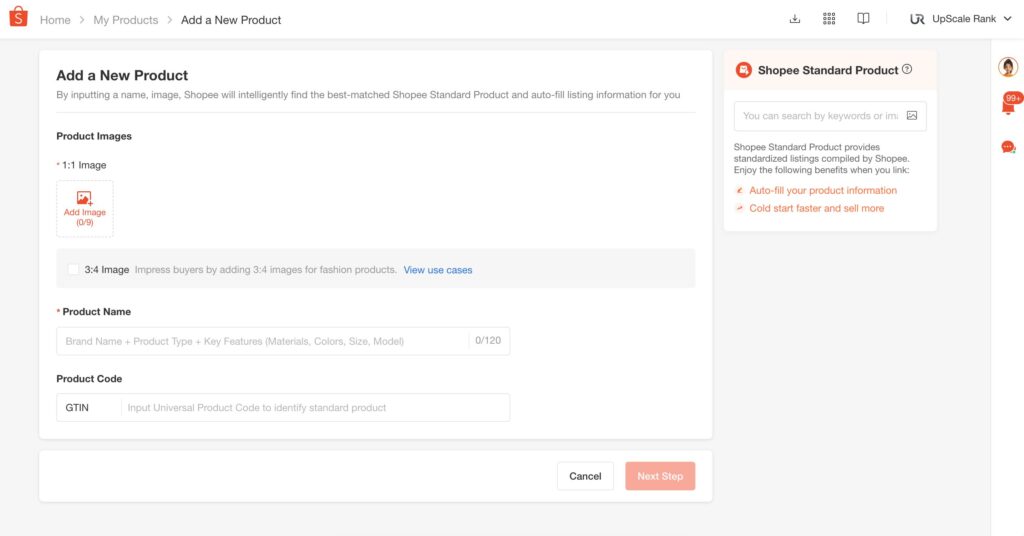
Items can be added one by one in Seller Centre, uploaded in bulk with a spreadsheet, or synced through a listing tool. Whichever method you use, three things decide how well each listing performs.
Write Titles and Descriptions That Rank (Thai vs English Keywords)
Put the most important keyword early in the title, since search reads the first characters hardest.
Write descriptions in Thai for local buyers, with short lines and real answers about material, size, and usage. Add English keywords for brand names and model numbers, because Thai shoppers often search those in English. Stuffed titles look spammy and get skipped.
Product Photo and Video Requirements
Use a clean, sharp main photo, then add shots of the back, sides, and details, plus one photo of the product in real use.
A short video lifts conversion noticeably on Shopee, so add one where you can. Thai buyers rely heavily on images, and reviews with photos, before deciding.
Categories, Attributes, and Variations
Pick the most accurate category, not the busiest one. Fill in every attribute field, even the optional ones, because attributes feed the search filters buyers use.
Set up size and color variations inside one listing instead of separate listings, so reviews and sales history stay together.
Step 6: Price Your Products with Thai Fees and VAT in Mind
Set prices with every cost on the table: product cost, commission, transaction fee, program service fees, packaging, and any voucher you plan to run.
A common mistake is pricing off the shelf price alone and discovering the margin is gone after fees. Build a simple spreadsheet per product, add your target profit, and work backwards to the listing price.
Leave room for campaign discounts, and remember VAT obligations kick in once your revenue passes the registration threshold.
Step 7: Set Up Shipping and Delivery
Shipping in Thailand is well covered, and you control which channels are switched on. Set this up carefully, because delivery speed and cost directly affect your ranking and reviews.
Choose Your Couriers
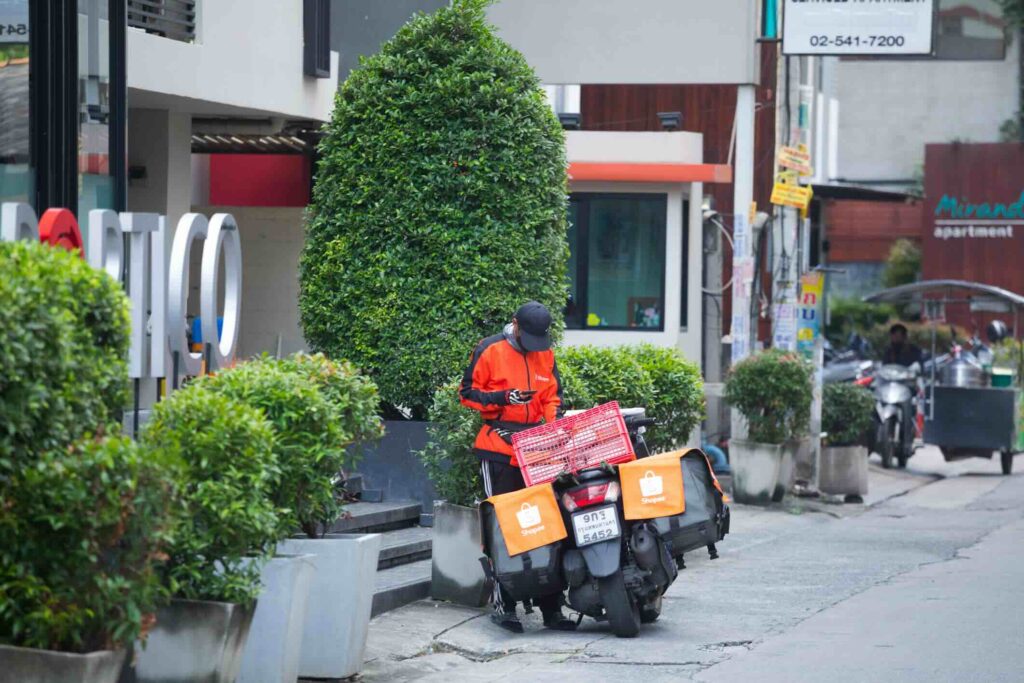
Enable the couriers you can actually serve: SPX Express, Flash Express, J&T Express, and Kerry Express are the main options.
Packages are collected at your address or dropped at a nearby point after you print the label. Keep your promised handover time, since late shipments hurt your rating.
Cash on Delivery (COD)
COD remains popular with Thai buyers, especially outside Bangkok. The buyer pays the courier in cash, and Shopee still settles the money into your Seller Balance as usual.
Keeping COD switched on widens your audience, and Shopee’s process protects you when a buyer refuses the parcel.
Step 8: Learn the Basics and Launch
New sellers get a set of onboarding missions inside Seller Centre, and free Thai-language lessons are available through Shopee University and the Seller Education Hub.
The materials cover policies, order handling, and the main tools, and finishing the missions often unlocks small rewards like vouchers or ad credits.
Go through them properly instead of clicking past. Once your listings are approved and shipping is set, your shop is live and ready for orders.
Step 9: Promote Your Shop and Win Your First Orders
A live shop with no traffic sells nothing, so promotion starts on day one. Shopee gives Thai sellers free tools that raise visibility, and small budgets go a long way in the first weeks.
Focus on the three tools below before spending on anything else, and track what each one actually brings in.
Join Shopee Campaigns and Mega Sales
Open the Marketing Centre and check the campaign section. Mega sales like 9.9, 10.10, 11.11, and 12.12 bring enormous traffic in Thailand, and payday campaigns at month-end are easier to enter.
Each campaign has criteria on price, stock, and rating, so register early and prepare stock before the date.
Join the PRIME Seller Program
PRIME Seller replaced the old Free Shipping and Xtra discount programs in Thailand. You pay a service fee per order, and in return buyers get free shipping vouchers on your items, your listings rank better, and perks like 0 percent SPayLater installments are included. Run the numbers on cheap items, since the fee bites harder on small baskets.
Vouchers, Flash Deals, and Bundle Deals
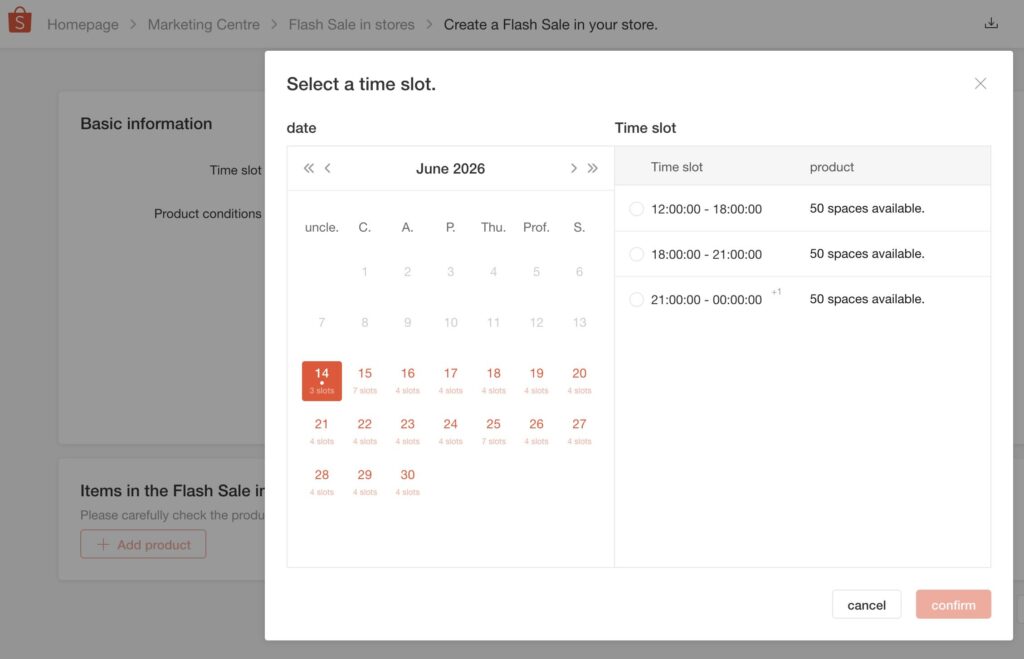
Shop vouchers, Flash Deals, and bundle deals are set up in a few clicks. A small voucher paired with free shipping removes most buyer hesitation.
Flash Deals create urgency, and bundles raise the average order value. Rotate these tools instead of running everything at once, then keep what performs.
Shopee Ads and Shopee Live
Shopee Ads push your products higher in search results and onto discovery pages. Start with a small daily budget on your best listings, run it for a week, and check the cost per order before scaling.
Test Shopee Live too. Thai shoppers buy heavily through livestreams, and even a simple phone setup showing the product honestly can outsell polished ads.
Step 10: Track Performance with Business Insights
Business Insights is the data dashboard inside Seller Centre, and it should be checked weekly at minimum.
Watch three numbers: visitors, conversion rate, and average order value. Low traffic points at titles, keywords, or ads. Decent traffic with poor conversion points at price, images, or reviews.
Work toward Preferred Seller status as well, which currently requires a shop rating around 4.7 and a cancellation rate under 2 percent. The badge lifts trust, visibility, and campaign access.
Frequently Asked Questions About Selling on Shopee Thailand
Here are the questions new sellers in Thailand ask most, answered briefly.
Can foreigners sell on Shopee Thailand?
Yes, with conditions. Individual registration expects a Thai national ID, so most foreigners go one of two routes: register a Thai company and open the shop under it, or join Shopee’s cross-border program and sell into Thailand without a local entity.
A Thai bank account is required for local payouts, and banks now ask for a long-term visa before opening one. Plan the banking side before anything else.
Do I need to register a business or pay tax to sell on Shopee in Thailand?
Individuals can start selling with just an ID, no company needed. Income earned on Shopee is still taxable and should be declared. VAT registration becomes mandatory once annual revenue passes 1.8 million THB.
Keep simple records of sales and costs during your first months, since cleaning up later is painful. A session with an accountant is money well spent once orders become regular.
What is Preferred Seller status and how do I get it?
Preferred Seller is a badge granted to shops with strong service records. The bar sits around a 4.7 shop rating, a cancellation rate under 2 percent, fast chat responses, and steady sales, and shops are reviewed on a regular cycle.
The badge shows on your listings, buyers filter searches by it, and it unlocks better program and campaign access. Treat it as your first real milestone after launch.
Can I sell on Shopee Thailand from another country?
Yes, through the cross-border program, which lists your products on the Thai site while you ship through Shopee’s cross-border logistics. It requires a registered business and suits sellers testing demand.
Building a serious long-term presence usually works better with a Thai entity, local stock, and fast domestic delivery, since delivery speed weighs heavily on ranking and reviews here.
How do returns and refunds work for Thai buyers?
Buyers can request a return or refund within the stated window after delivery. Requests are reviewed in Seller Centre, where you accept or dispute with photos and evidence.
COD orders are handled inside the same system, so refunds do not come out of your pocket directly. Respond quickly, because ignored requests are decided in the buyer’s favor and slow handling drags down your rating.
Should I sell on Lazada Thailand too?
For most sellers, yes. Lazada is the second-largest marketplace in Thailand, and its buyer base only partly overlaps with Shopee’s, so a second store usually adds sales without much extra product work.
Keep stock and prices in sync between the two so you never oversell. Our guide on how to sell on Lazada in Thailand walks through the setup.
Conclusion: Start Selling on Shopee Thailand Today
Selling on Shopee Thailand needs no money upfront, just the right papers and some preparation.
Register with your Thai ID or DBD documents, link a matching bank account, list well-written products in Thai, and switch on the couriers you can serve.
After launch, campaigns, PRIME Seller, and your shop data decide how fast you grow. New to Shopee overall? Start with the general How to sell on Shopee guide.
Need help with setup or optimization? Get in touch.