
How to Sell on Lazada in 2026:
A Complete Step-by-Step Guide for Beginners
Lazada is one of the biggest online marketplaces in Southeast Asia, serving millions of shoppers in Thailand, Singapore, Malaysia, Vietnam, the Philippines, and Indonesia.
Opening a store there costs nothing, and the platform gives you the tools, the logistics, and the traffic to start selling fast.
This guide covers the whole process: what Lazada is, how the fees work, how to open your store, and how to win your first orders.

Overview: What You Should Know Before Selling on Lazada
A little background saves a lot of mistakes later. This section covers how Lazada works, which account type fits you, and what selling actually costs.
What Is Lazada and Where Does It Operate?
Lazada is an online marketplace founded in 2012 and owned by Alibaba Group since 2016. It runs six separate sites across Southeast Asia: Thailand, Singapore, Malaysia, Vietnam, the Philippines, and Indonesia.
Each country has its own Seller Center, its own fees, and its own rules, so a store opened in Thailand will not appear in Malaysia. You register in the country where you want to sell, and cross-border options exist for sellers based somewhere else.
Why Sell on Lazada?
The numbers make a strong case. Lazada reaches millions of active buyers every month, and mega sales like 11.11 and 12.12 bring huge spikes in traffic.
Opening a store is free, payment processing is handled by the platform, and its own logistics network covers delivery.
Buyer trust is already built in, especially through LazMall, so new sellers do not need years of reputation building before orders come in.
The 3 Types of Lazada Seller Accounts
Before you register, pick the account type that fits your situation. Each one comes with different requirements and fees.
Lazada Marketplace Seller
This is the standard option for local individuals and businesses. Registration is quick, there are no upfront costs, and most new sellers start here. You sell under your own store name and compete on price, service, and reviews.
LazMall Seller
LazMall is reserved for brand owners and authorized distributors. Stores get a badge, better placement in search, and access to exclusive campaigns.
In return, the requirements are stricter, commission is higher, and shoppers expect authentic products with a longer return window.
LazGlobal (Cross-Border) Seller
Sellers based outside Southeast Asia can join through LazGlobal, the cross-border program. A registered business is required, individual sign-ups are not accepted, and shipping usually runs through Lazada’s cross-border logistics. It is a practical way to test the region without opening a local company.
What You Need Before You Register
Have these ready before you start: a valid national ID or passport, a business registration certificate for corporate accounts, a phone number, an email address, and a local bank account for payouts. Requirements differ by country.
Thailand accepts individual sellers with just an ID, while Malaysia, Singapore, Vietnam, and the Philippines generally ask for business registration. A few products ready to list will also speed things up, since new stores must list items before going live.
How Much Does It Cost to Sell on Lazada?
Signing up is free. There are no listing fees and no monthly charges, so you only pay when something sells. Three costs come out of each order: a category commission that varies by country and product type, a payment fee of around 2 percent, and tax where it applies.
LazMall commission runs higher than the regular marketplace rate. Lazada also gives many new sellers a commission-free period after opening, which makes the first months cheaper. Always check the current fee table in your country’s Seller Center.
How to Start Selling on Lazada: Step-by-Step
The steps below apply everywhere Lazada operates. The platform works the same way in every market, but documents, fees, taxes, and payout details change by country.
For the exact local requirements, read our dedicated guides: how to sell on Lazada in Thailand, Singapore, Malaysia, Vietnam, Indonesia, and the Philippines. Once you know your market, follow these ten steps to get your store live.

Step 1: Register Your Seller Account on Lazada Seller Center
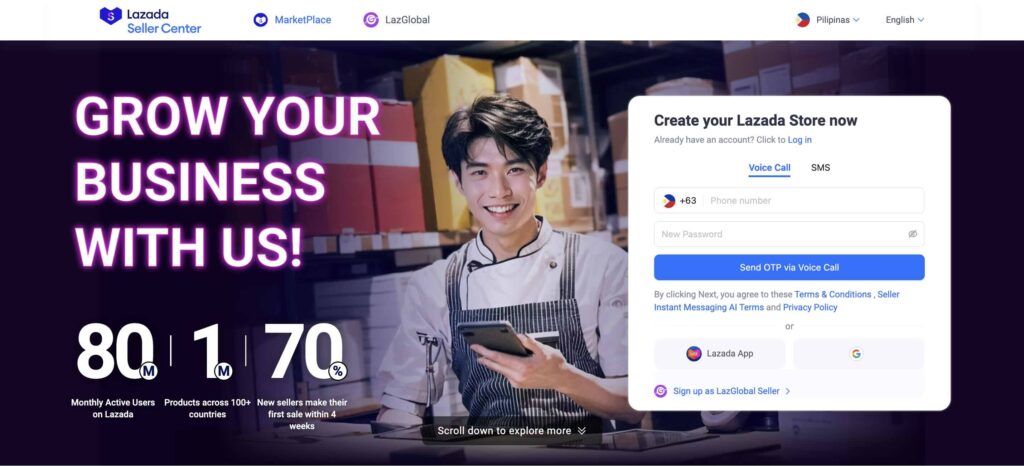
Go to the Lazada Seller Center for your country and click sign up. You can register with a phone number or an email address, and a one-time password will be sent to confirm it.
Pick your seller type, fill in your name and address, and agree to the terms. The form takes about ten minutes. Use details that match your ID or business papers, because mismatched information is the most common reason applications get rejected.
Step 2: Verify Your Identity and Submit Documents
After sign-up, Lazada asks for documents to confirm who you are. Uploads are reviewed by the Lazada team, and approval usually arrives within a few business days.
Documents for Individual Sellers
Some markets let individuals sell with a national ID card or passport. Upload a clear photo of the document plus bank details under the same name. Blurry images are a frequent cause of delays, so scan them properly.
Documents for Business Sellers
Corporate accounts need the company registration certificate issued in that country, for example SSM in Malaysia, DTI or SEC in the Philippines, or ACRA in Singapore. Tax documents may also be requested. The bank account must belong to the registered company.
Step 3: Set Up Your Store Profile
Once approved, open Seller Center and complete your store profile. Choose a store name that is short, easy to spell, and close to your brand, because changing it later can be a hassle.
Add your pickup or warehouse address, set your operating hours, and fill in the shipping settings. A clear store logo and banner help too. Buyers do check store pages before ordering, so a complete profile quietly lifts your conversion rate.
Step 4: Add Your Bank Details and Seller Wallet
Head to the finance section and add your bank account. The account name has to match your registered name or company name, otherwise payouts will fail.
Many countries also offer a Seller Wallet where sales money lands first before withdrawal. Check the statement cycle for your market so you know when money arrives. Setting this up early means your first sale pays out without delays.
Step 5: List Your First Products
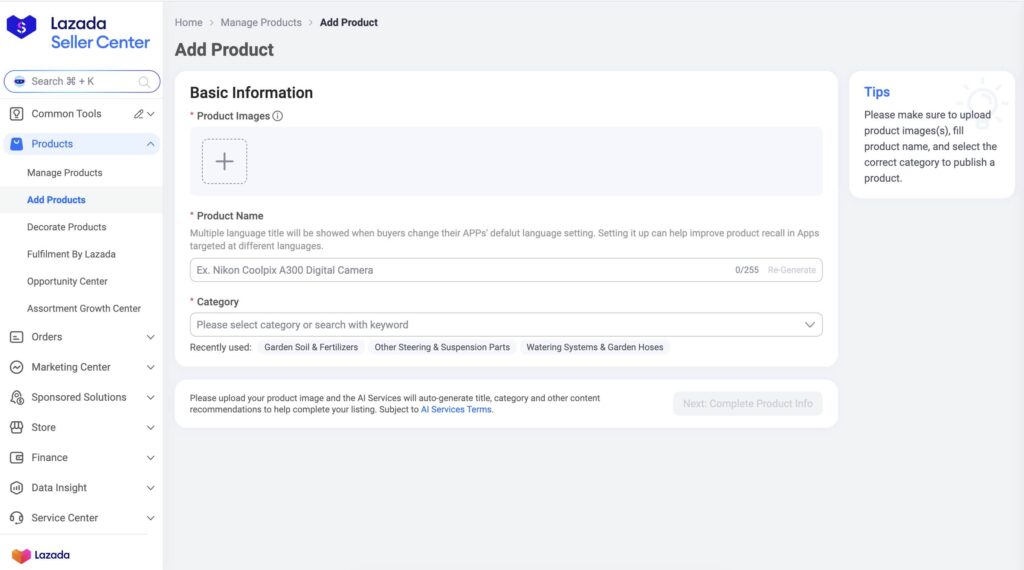
New stores must list a handful of products before going live, usually at least five. Items can be added one by one, uploaded in bulk with a spreadsheet, or synced through a third-party listing tool. Whichever method you use, three things decide how well a listing performs.
Write Product Titles and Descriptions That Rank in Lazada Search
Lazada search reads your title first, so put the important keywords early: brand, product type, size or model, then key attributes. Write the description for humans, with short lines and real answers about material, dimensions, and usage.
Stuffed titles look spammy and get skipped. Well-written listings rank higher and convert better, which is why title and description work deserves real effort.
Follow Lazada’s Product Image Requirements
Your main photo must sit on a plain white background, sharp and well lit. Add more shots showing the back, sides, and details, plus one photo of the product in real use. Follow the size rules in Seller Center so images do not get rejected.
Choose the Right Category and Fill In All Attributes
Pick the most accurate category, not the busiest one. Then fill in every attribute field, even the optional ones. Attributes feed the search filters buyers use, and incomplete listings are often left out of campaigns. Two minutes of extra typing here pays off in visibility.
Step 6: Price Your Products Correctly
Set prices with all costs on the table: product cost, commission, payment fee, packaging, shipping subsidies, and any voucher you plan to run. A common mistake is pricing off the shelf price alone and discovering the margin is gone after fees.
Build a simple spreadsheet per product, add your target profit, and work backwards to the listing price. Leave a little room for campaign discounts, since promotions on Lazada usually require a genuine price cut.
Step 7: Choose Your Shipping and Fulfillment Method
Lazada gives you two ways to get orders delivered, and you can switch or combine them as your store grows.
Fulfillment by Lazada (FBL)
With Fulfillment by Lazada, your stock is stored in a Lazada warehouse and every order is picked, packed, and shipped by the platform. Delivery is faster, your listings get an FBL badge, and delivery complaints are handled for you. Storage fees apply, so it suits products that sell steadily.
Ship Orders Yourself
You can also pack orders on your own. A courier collects packages at your address after you print the shipping label. Keep your promised handover time, because late shipments hurt your seller rating and can trigger penalties. This route works well for new stores with small volume.
Step 8: Complete the New Seller Training and Launch Your Store
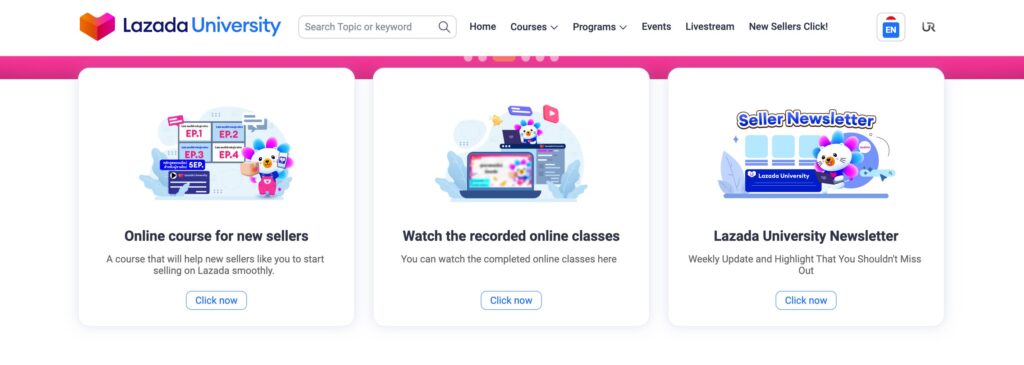
New sellers are asked to complete a short onboarding program, often through Lazada University or the new seller missions inside Seller Center. The lessons cover policies, order handling, and the basic tools, and some markets make them mandatory before the store goes live.
Go through them properly instead of clicking past. Once training is done and your listings are approved, your store is live and ready for orders.
Step 9: Promote Your Store and Get Your First Sales
A live store with no traffic sells nothing, so promotion starts on day one. Lazada gives sellers free tools that raise visibility, and small budgets go a long way in the first weeks. Focus on the three tools below before spending on anything else, and track what each one actually brings in.
Join Lazada Campaigns and Mega Sales
Open the Marketing Center in Seller Center and check the Campaign tab. Mega sales like 11.11, 12.12, and payday sales bring massive traffic, and smaller weekly campaigns are easier to enter. Each campaign has criteria on price, stock, and rating, so register early and prepare stock before the date.
Set Up Vouchers, Flash Sales, and Bundle Deals
Store vouchers, flash sales, and bundle deals are set up in a few clicks. A small voucher paired with free shipping removes most buyer hesitation. Flash sales create urgency, and bundles raise the average order value. Rotate these tools instead of running everything at once, then keep what performs.
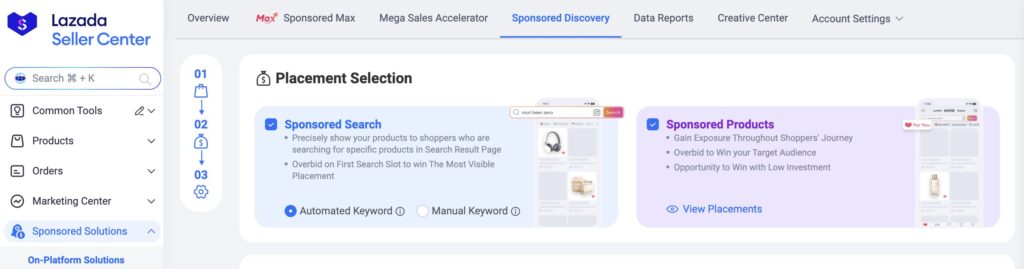
Use Lazada Sponsored Ads
Lazada’s ad tools push your products higher in search results and onto the homepage. Start with a small daily budget on your best listings, let it run for a week, and check the cost per order before scaling. Ads amplify good listings, they cannot fix weak ones.
Step 10: Track Your Store Performance with Business Advisor
Business Advisor is the data dashboard inside Seller Center, and it should be checked weekly at minimum. Watch three numbers: visitors, conversion rate, and average order value. Low traffic points at titles, keywords, or ads. Decent traffic with poor conversion points at price, images, or reviews.
The dashboard also tracks your seller rating and shipping performance, which affect search ranking. Small, regular fixes based on real data beat big random changes every time.
Frequently Asked Questions About Selling on Lazada
Here are the questions new sellers ask most, answered briefly.
How long does Lazada take to approve a new seller account?
Most applications are approved within 3 to 7 business days. Delays are usually caused by unclear document photos or details that do not match between the form and the ID.
If an application is rejected, the email states the reason, and you can fix the issue and reapply. Contacting seller support through the Seller Center chat also helps when the wait passes a week.
Can I sell on Lazada and Shopee at the same time?
Yes, and many sellers do. Neither platform demands exclusivity. The main challenge is operational: stock and prices must stay in sync so you do not oversell an item on one platform after it sold out on the other.
Multichannel tools or a simple daily routine solve this. Selling on both usually lifts total sales, since the buyer bases only partly overlap.
What products are prohibited or restricted on Lazada?
Each country publishes its own prohibited and restricted list, but the usual items apply everywhere: weapons, drugs, counterfeit goods, recalled items, and adult content. Some categories, like health supplements or electronics with batteries, may need permits or pre-approval.
Listing a banned item can get the listing removed, points deducted, or the account suspended, so check the policy page for your market before uploading anything unusual.
How and when does Lazada pay sellers?
Sales money is released after the order is delivered and the return window closes. Payouts are then sent to your bank account or Seller Wallet on a weekly cycle in most markets.
The statement in Seller Center breaks down every order, fee, and deduction. Keep an eye on it during your first month so you understand exactly what lands in your account.
What happens when a customer returns an item or files a dispute?
Buyers can return items within the stated window, typically 7 days on the regular marketplace and longer on LazMall. When a return request arrives, you review it in Seller Center and accept or dispute it with evidence.
Return shipping is paid by the party at fault in most cases. Handled quickly, returns barely dent your rating. Ignored ones escalate and cost far more.
How do I upgrade my store to LazMall?
You can apply once you own a registered trademark or hold an authorization letter, and your store meets the performance bar on rating, shipping time, and cancellation rate.
The application is submitted through Seller Center, and the review takes a couple of weeks. Approval brings the LazMall badge, better search placement, and campaign access, in exchange for higher commission and stricter service standards.
Conclusion: Start Selling on Lazada Today
Selling on Lazada does not require money upfront, just preparation. Register in your country’s Seller Center, get your documents approved, list well-written products, and pick a shipping method that fits your volume.
After launch, campaigns, vouchers, and your store data decide how fast you grow. Start with the guide for your market, Thailand, Singapore, Malaysia, Vietnam, Indonesia, or the Philippines, and open your store this week.
Need help with setup or optimization? Get in touch.